Control panel real-time

By accessing real time whilst in the control panel programming section, the software will open a new section showing the active events in the system, grouped by category:
|
|
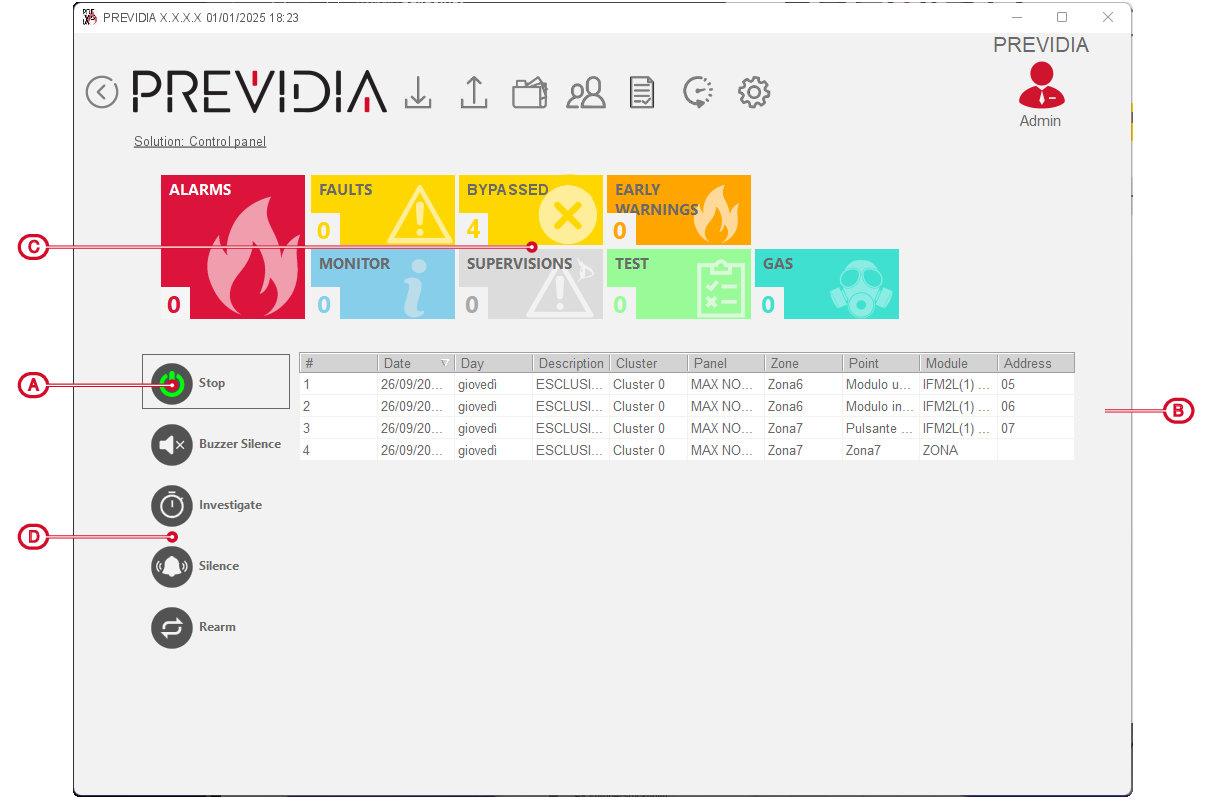
Each event category is represented by a field showing the number of events of the currently active type.
By clicking on one of the fields it is possible to view all the events in the associated category. The events are listed in chronological order.
By clicking on an event generated by a loop device, you access the management page of the device itself.
The priority is shown in the following list:
|
1 |
ALARMS |
Signalling associated with fire-alarm conditions. These indicate potentially dangerous conditions which require maximum attention. When an alarm occurs, the section below the event buttons [B] shows the pre-alarm time count in progress and then, alarm over, the summary of information on the zones in alarm. |
|
2 |
GAS |
Signalling associated with gas-detection alarm conditions. These indicate potentially dangerous conditions which require maximum attention. |
|
3 |
EARLY WARNINGS |
Signalling triggered by detectors with a threshold below that set for alarms. Cautionary alert which must be evaluated with attention and verified. |
|
4 |
SUPERVISIONS |
Signalling of the activation of a device that has a control function (supervision) of another part of the system. Indicates a risk which may jeopardize the proper operating capacity of the system. |
|
5 |
FAULTS |
Signals relating to of faults detected in the system. They represent risk conditions that may compromise the proper operating capacity of the system. |
|
6 |
MONITOR |
These are non-alarm or fault signals that can be configured during installation, normally used to provide indications to the user. They are signals of minor importance and the level of attention required depends on the use made of these signals during the system configuration phase. |
|
7 |
BYPASSED |
These signals indicate the bypassing of one or more of the system elements. They indicate that it is necessary to consider that parts of the system might not be operative. |
|
8 |
TEST |
These signals indicate that at least one of the system elements is in test status. This condition, to be applied during maintenance operations, maintains parts of the system in non-operative status, therefore, putting the premises in danger as the protection level of the system is reduced. |
The function buttons at the bottom reproduce exactly the buttons on the front panel of the control panel, next to the display:
|
Silence buzzer |
|
This button silences the control panel buzzer. Events which occur after silencing will reactivate the buzzer. |
|
Investigate |
|
Button to request supplementary investigation time and thus lengthen the early-warning period. |
|
Silence sounder |
|
During alarm status, this button can be used to stop the audible and visual signalling devices. Pressing this button again will reactivate the silenced audible and visual signalling devices. |
|
Rearm |
|
Button for the annulment of active events and the reset of standby conditions. |